
How to add a WWCC Exemption to a Learner NSW registration
1. Sign in to your PlayFootball account at https://rego.prd.letsplayfootball.au/signin
2. Click ‘Profile’ to navigate to your profile

3. Select ‘Supported Documents’ and click ‘Request Exemption’

4. Select the State and Reason for request. Click the drop down and ensure you select the Learner product to tie the exemption to.
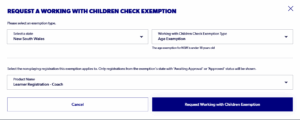
5. Submit exemption.
Need help?
Can't find the answer to your question? Get in touch with our support team.
Request support