
How to Bulk Rollover Registration Products
Club Administrators
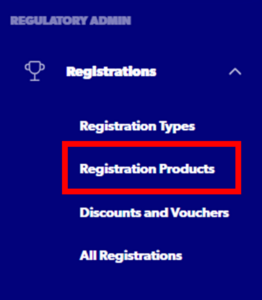
Step 1 – Select ‘Registrations’ – > ‘Registration Products’ from the side navigation menu.
Step 2 – Select ‘Bulk Roll-Over’

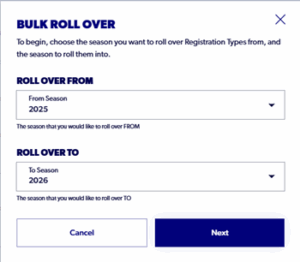
Step 3 – Select ‘2025’ as the from season and 2026 as the To season
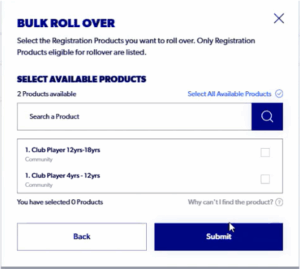
Step 4 – Select the Registration Products you want to rollover and select ‘Submit’. You can roll over more than one Registration Product at a time.
Step 5 – When the registration product has been rolled over, it will appear as a Draft under the 2026 season. Click the 3 dots on the product and Edit Draft to add any new fees, additional questions, and payment methods. 
Once submitted and in the ‘Approved’ status, the product will be live on the front end.
Need help?
Can't find the answer to your question? Get in touch with our support team.
Request support