
How to Export Your Club’s Fixtures in Dribl
How to Export Your Club’s Fixtures in Dribl
1. Click the Events menu.

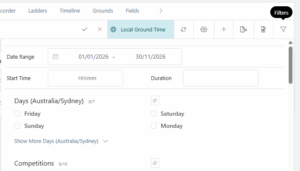
2. Click the Filter button and filter by Date, League, Age Groups. Click submit to save your Filter
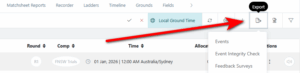
3. Click the Export button and select Events
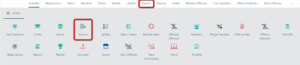
4. Navigate to the Exports menu. This should appear on the top menu bar. If does not appear, click Overview on the menu bar and select it from the list of icons
5. Click the download button on your export. Depending on your browser, you should receive a pop up notification of the download.
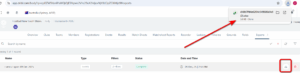
6. If this does not appear, click the downloads icon in the top right corner to view recent downloads (on Chrome).

7. Clicking this file will open your export, where you can view all matches in a spreadsheet

You may have to change the “Date” column from text to Dates to allow filtering and ordering by the correct date. For step by step instructions on how to complete this task, you can view this YouTube tutorial: https://www.youtube.com/watch?v=VtVB-XsooiM&t=249s
Need help?
Can't find the answer to your question? Get in touch with our support team.
Request support