
How to nominate a team to Association Championships (For FNSW Associations)
The below process details the steps for Football NSW Associations to perform the team nomination process via the Dribl Admin system.
1. Navigate to the Clubs Menu
2. Select the Association based club the team will play under (This should be a generic association based club e.g. Central Coast Football)
3. Navigate to the Teams menu and click the ‘Map Members’ icon to open the team mapper. Dribl have already created the relevant teams for the Association Championships.

4. Toggle from This Club to All Clubs to search all players in the associaiton.
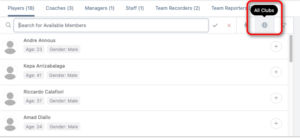
5. Search for each member and add them to the team.
Ensure all members are made Match Sheet Available
6. Once all players are mapped, select Edit Team Submission and navigate through the options to submit team to Deploy Association Championships.
7. Review and ensure all Team Members are listed in the submission, then click Next.
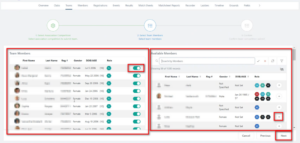
8. Click Submit. The team submission request will be sent to the Football NSW Competitions team for approval.
Need help?
Can't find the answer to your question? Get in touch with our support team.
Request support